
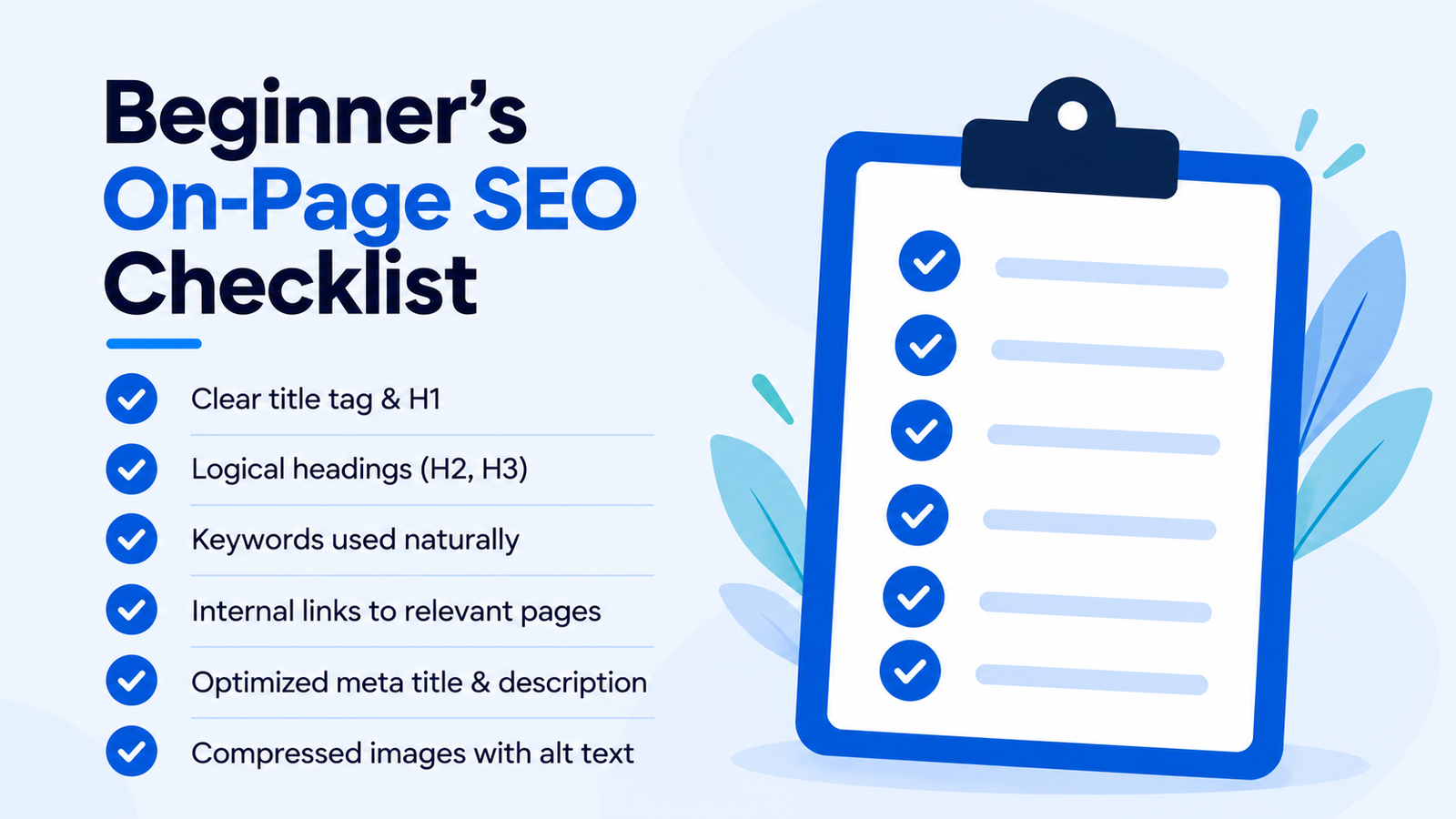
An on-page SEO checklist helps you optimize your website for search engines and visitors. It covers essential tasks such as keyword research, content optimization, image SEO and internal linking.
Are you struggling to get your website noticed on Google? Perhaps you have published several blog posts but haven’t received much organic traffic. If so, improving your on-page SEO is a useful place to start.
Search engine optimization can seem complicated at first. However, you don’t need advanced technical skills to understand the basics. With the right approach, you can make your website easier to navigate and understand.
Moreover, well-organized content helps visitors find answers quickly. As a result, your website can provide a better experience for potential customers.
In this beginner-friendly guide, you’ll learn essential on-page SEO techniques through practical examples. You’ll also discover common SEO mistakes and how to avoid them.
Let’s explore how to optimize your website step by step.
What Is On-Page SEO?
On-page SEO refers to the process of improving individual webpages for users and search engines. It focuses on content and page elements you can control directly.
For example, you can optimize your blog title, headings, images and internal links. These changes help explain your page’s main topic.
Unlike off-page SEO, on-page optimization happens within your website. Therefore, it is an important starting point for beginners.
Important Elements of On-Page SEO
The main elements include:
- Keyword research and search intent
- SEO-friendly title tags
- Meta descriptions
- H1, H2, and H3 headings
- High-quality website content
- SEO-friendly URLs
- Image optimization and alt text
- Internal and external linking
- Mobile-friendly website design
- Page loading performance
Together, these elements support a clear and useful website structure.
Why Is an On-Page SEO Checklist Important?
Following an on-page SEO checklist helps you review important webpage elements before publishing.
Although optimization cannot guarantee rankings, it can improve content relevance and usability.
1. Helps Search Engines Understand Your Content
Search engines analyze webpage content, titles, headings, and links.
Clear information helps them understand your page’s main subject. Consequently, your content can be evaluated for relevant search queries.
2. Supports Organic Search Visibility
Relevant content can help your website appear in suitable search results.
However, search visibility also depends on competition, website quality and other ranking factors.
3. Improves User Experience
Visitors prefer websites that are easy to read and navigate.
Therefore, descriptive headings and helpful links can improve the browsing experience.
4. Attracts Relevant Website Visitors
Targeting relevant search terms helps you create content for specific audiences.
For instance, a beginner searching for SEO tips may find a step-by-step tutorial more useful than a technical report.
5. Supports Business Goals
A well-organized website makes important information easier to find.
Additionally, useful content can guide visitors toward related services, products or enquiry pages.
Complete On-Page SEO Checklist: 15 Essential Steps
Now that you understand the basics, let’s explore the complete website SEO checklist.
Each step explains what to optimize and how to get started.
Step 1: Conduct Keyword Research for On-Page SEO
Keyword research helps you discover the search terms your audience uses.
Before writing content, select a primary keyword that matches your topic.
For this article, the focus keyword is:
On-page SEO checklist
Related keywords include:
- On-page SEO for beginners
- On-page SEO techniques
- SEO checklist for beginners
- Website SEO optimization
- On-page SEO best practices
- How to do on-page SEO
- SEO optimization checklist
These related terms help you cover the topic more completely.
How to Find Relevant Keywords
First, identify your blog’s main subject. Next, consider the questions your audience might ask.
Then, explore keyword ideas using tools such as:
- Google Keyword Planner
- Google Trends
- Google Search Console
- Semrush
- Ahrefs
Finally, choose keywords based on relevance and search intent.
SEO Tip: Avoid selecting keywords only because they have high search volume. Instead, focus on terms that match your content.
Step 2: Understand Search Intent
Search intent describes what users want when they search online.
Understanding this intent helps you create relevant content.
Four Common Types of Search Intent
Informational Intent
Users want to learn something.
Example: “What is on-page SEO?”
Navigational Intent
Users want to find a particular website.
Example: “Google Search Console login”
Commercial Intent
Users want to compare available options.
Example: “Best SEO tools for beginners”
Transactional Intent
Users want to complete an action.
Example: “Buy digital marketing course online”
How to Match Your Content With Search Intent
Start by identifying the purpose behind your target keyword.
For example, someone searching for an SEO checklist probably wants actionable instructions.
Therefore, a practical tutorial with examples is a suitable format.
Step 3: Optimize Your SEO Title
An SEO title describes the subject of your webpage.
Google may use it when generating the clickable title in search results.
Consequently, your title should be accurate, descriptive and relevant.
How to Write an SEO-Friendly Title
Follow these practices:
- Include your primary keyword naturally.
- Keep the title clear and relevant.
- Explain what readers will learn.
- Write a unique title for each page.
- Avoid repeating keywords unnecessarily.
Example of SEO Title Optimization
Poor Title:
SEO Tips and Website Optimization Guide
Optimized Title:
On-Page SEO Checklist for Beginners: Step-by-Step
The improved version describes the content more clearly.
Additionally, it includes the primary keyword without unnecessary repetition.
Step 4: Write an Effective Meta Description
A meta description summarizes the content of a webpage.
Although Google may generate its own search snippet, a helpful description can explain your page’s value.
Meta Description Optimization Tips
A good meta description should:
- Summarize the webpage accurately.
- Include relevant keywords naturally.
- Highlight the benefit for readers.
- Use simple and clear language.
- Avoid misleading information.
Example of an SEO-Friendly Meta Description
“Follow this on-page SEO checklist for beginners to optimize titles, keywords, content, images and links with easy step-by-step tips.”
This description introduces the topic and explains what readers will learn.
Step 5: Create an SEO-Friendly URL
Your URL should describe the webpage’s content.
Short, meaningful URLs are easier for visitors to read and share.
Example of URL Optimization
Poor URL:
www.example.com/blog/post123?id=456
Optimized URL:
www.example.com/on-page-seo-checklist/
The second URL clearly identifies the page’s topic.
Best Practices for SEO-Friendly URLs
- Use descriptive words.
- Separate words with hyphens.
- Avoid unnecessary numbers.
- Keep URLs readable.
- Maintain a consistent URL structure.
However, avoid changing published URLs without a good reason. If you must change one, use an appropriate redirect.
Step 6: Optimize H1, H2, and H3 Headings
Headings divide content into meaningful sections.
They also make long articles easier to scan.
What Is an H1 Heading?
An H1 heading represents the main topic of a page.
Example:
On-Page SEO Checklist for Beginners: Step-by-Step
Use a clear main heading that describes the article.
What Are H2 Headings?
H2 headings introduce important sections.
For example:
- What Is On-Page SEO?
- Why Is an On-Page SEO Checklist Important?
- Complete On-Page SEO Checklist: 15 Essential Steps
What Are H3 Headings?
H3 headings organize smaller topics within an H2 section.
For example:
- How to Find Relevant Keywords
- Meta Description Optimization Tips
- Best Practices for SEO-Friendly URLs
Tips for Optimizing Heading Tags
Keep headings descriptive and arrange them logically.
Furthermore, include your focus keyword or related phrases when they fit the topic.
Avoid adding keywords to headings that don’t need them.
Step 7: Use Keywords Naturally in Your Content
Keyword placement helps communicate your webpage’s subject.
However, repeating keywords too frequently can make your content difficult to read.
Where Should You Place Your Focus Keyword?
Consider these locations:
- SEO title
- Main H1 heading
- First paragraph
- Relevant H2 and H3 headings
- URL slug
- Body content
- Meta description
Example of Natural Keyword Placement
“Using an on-page SEO checklist helps beginners review their content before publishing.”
This sentence includes the focus keyword naturally.
Avoid Keyword Stuffing
Keyword stuffing happens when keywords appear excessively or unnaturally.
For instance, repeating the same phrase several times in one sentence makes the text awkward.
Instead, explain your topic using clear language and related terms.
SEO Tip: There is no required keyword density percentage for Google rankings.
Step 8: Create Helpful and Original Content
High-quality content is a central part of on-page SEO.
Your article should answer questions and offer useful information.
How to Write SEO-Friendly Content
Understand Your Audience
Identify what readers want to learn. Then, explain the topic at an appropriate level.
Add your own explanations, examples, and insights.
Use Short Paragraphs
Short paragraphs improve readability. They also make information easier to scan.
Include Practical Examples
Examples help readers apply what they’ve learned.
Keep Information Updated
Review existing articles regularly. Update details when information becomes outdated.
Focus on Reader Needs
Above all, create content that genuinely helps your audience.
Example of Helpful Content
Basic sentence:
“Optimize images for SEO.”
Improved explanation:
“Compress large images, use descriptive filenames, and add meaningful alt text. Also, choose suitable image dimensions to improve website performance.”
The improved version provides clear instructions.
Step 9: Follow an Image SEO Checklist
Image optimization improves website accessibility and visual presentation.
Furthermore, properly sized images can support faster page loading.
How to Optimize Images for SEO
Use Descriptive Filenames
Avoid generic filenames such as:
IMG1234.jpg
Instead, use:
on-page-seo-checklist.webp
Add Meaningful Alt Text
Alt text describes informative images.
For example:
“On-page SEO checklist showing keyword research, title optimization, and internal linking.”
Compress Image Files
Reduce unnecessary file size while maintaining suitable quality.
Choose Efficient Formats
Use formats such as WebP or AVIF when appropriate.
Make Images Responsive
Ensure images display properly across devices.
Why Is Image Alt Text Important?
Alt text helps people using screen readers understand relevant images.
Additionally, it provides search engines with context about image content.
However, avoid adding keywords that do not accurately describe the image.
Step 10: Add Internal Links to Your Website
Internal links connect related pages within the same website.
They help visitors discover additional information.
Moreover, internal links help search engines find related content.
Benefits of Internal Linking
Internal links can:
- Improve website navigation.
- Connect related blog posts.
- Help visitors explore relevant topics.
- Support search engine crawling.
- Make important pages easier to discover.
Internal Linking Example
Suppose you’re writing about SEO optimization.
You could link to relevant articles covering:
- Keyword research for beginners
- Digital marketing projects for students
- Technical SEO fundamentals
- SEO tools for beginners
- Content marketing strategies
Internal Linking Best Practices
Use descriptive anchor text that explains the linked page.
For instance, “learn keyword research for beginners” is more informative than “click here.”
Additionally, link only to pages that provide relevant information.
Step 11: Include Relevant External Links
External links connect readers with resources on other websites.
These links can provide supporting information or official documentation.
Why Are External Links Helpful?
External resources allow readers to explore topics in more detail.
For example, Google’s official documentation explains important search optimization concepts.
Recommended SEO Resources
Google SEO Starter Guide
Google Search Console
Google PageSpeed Insights
External Linking Best Practices
Choose trustworthy and relevant resources.
Also, use clear anchor text and check links before publishing.
Remember, adding external links alone does not guarantee higher rankings.
Step 12: Make Your Website Mobile-Friendly
Mobile usability is an important part of website optimization.
Your webpages should work properly on smartphones, tablets, and desktop computers.
Mobile SEO Best Practices
- Use a responsive design.
- Make text easy to read.
- Keep navigation simple.
- Ensure buttons are easy to tap.
- Optimize images for smaller screens.
- Avoid intrusive pop-ups.
- Keep important content accessible.
How to Check Mobile Usability
First, open your website on a smartphone.
Next, review the text, menus, buttons, and images.
Finally, test different screen sizes using browser developer tools.
You can also review performance through Google PageSpeed Insights.
Step 13: Improve Website Loading Speed
Website loading speed affects the browsing experience.
Slow pages can frustrate visitors. Therefore, improving performance should be part of your SEO review.
How to Improve Page Loading Speed
Compress Large Images
Reduce image sizes without losing important visual details.
Remove Unnecessary Scripts
Avoid loading code that your website does not need.
Enable Browser Caching
Allow browsers to reuse suitable resources.
Choose Reliable Hosting
Select hosting that meets your website’s performance needs.
Review Installed Plugins
Remove unnecessary or poorly maintained plugins.
Use Lazy Loading Appropriately
Defer suitable below-the-fold images while prioritizing important content.
Tools for Checking Website Speed
You can use:
- Google PageSpeed Insights
- Chrome Lighthouse
- GTmetrix
However, focus on meaningful performance improvements rather than perfect scores.
Step 14: Check Website Indexing
Search engines need to discover and process webpages before displaying them in search results.
Therefore, your important pages should be accessible and eligible for indexing.
What Is Website Indexing?
Indexing is the process through which search engines analyze and store information about webpages.
If a page is excluded from indexing, it may not appear in search results.
What Is a Canonical URL?
A canonical URL identifies the preferred version of duplicate or very similar pages.
For example, two URLs might display the same article.
In that case, a canonical annotation can help indicate the preferred page.
However, Google makes the final canonical selection.
Website Indexing Checklist
- Check that important pages are not marked noindex.
- Ensure essential content is accessible.
- Use appropriate canonical URLs.
- Maintain an XML sitemap.
- Add internal links to important pages.
- Review indexing in Google Search Console.
Step 15: Review Your On-Page SEO Checklist Before Publishing
Before publishing, review your article carefully.
A final audit helps you identify missing information and avoid common errors.
Final On-Page SEO Checklist
Check the following:
- Have you selected a relevant focus keyword?
- Does the introduction explain the topic clearly?
- Does the content match search intent?
- Is the SEO title descriptive?
- Have you written a useful meta description?
- Is your URL readable?
- Are the headings organized correctly?
- Does the content provide original value?
- Have you added relevant images?
- Do informative images have appropriate alt text?
- Have you included useful internal links?
- Are external links relevant and working?
- Is your page mobile-friendly?
- Have you reviewed loading performance?
- Can search engines access the page?
Once you’ve completed these checks, your article will have a stronger foundation for search optimization.
Common On-Page SEO Mistakes Beginners Should Avoid
Even a well-written article can have optimization problems.
Fortunately, many common mistakes are easy to identify.
1. Using Too Many Keywords
Excessive keyword repetition makes content unnatural.
Instead, use related terms only when they add meaning.
2. Ignoring Search Intent
A webpage may miss its audience if it doesn’t answer the right questions.
Therefore, understand the searcher’s needs before writing.
3. Publishing Low-Value Content
Short or copied articles may fail to provide useful information.
To improve quality, add original explanations and practical examples.
4. Forgetting Image Alt Text
Missing alt text can reduce image accessibility.
Consequently, describe informative images accurately.
5. Ignoring Internal Links
Without internal links, readers may struggle to discover related articles.
Instead, connect useful pages naturally.
6. Overlooking Mobile Users
Poor mobile layouts make websites difficult to navigate.
Therefore, test your pages across different devices.
7. Relying Only on SEO Plugin Scores
SEO plugins can highlight potential problems.
However, a green score does not guarantee higher Google rankings.
Prioritize useful content and a positive user experience.
On-Page SEO vs. Off-Page SEO vs. Technical SEO
Search engine optimization includes several connected areas.
Understanding their differences helps beginners create a more complete strategy.
What Is On-Page SEO?
On-page SEO focuses on individual webpage elements.
Examples include titles, headings, keywords, content, and internal links.
What Is Off-Page SEO?
Off-page SEO focuses on signals outside your website.
For example, relevant backlinks and digital PR activities fall into this category.
What Is Technical SEO?
Technical SEO focuses on website accessibility and technical performance.
It includes indexing, crawling, sitemaps, canonical URLs, and other technical elements.
Although these areas differ, they work together as part of a broader SEO strategy.
Frequently Asked Questions About the On-Page SEO Checklist
1. What Is an On-Page SEO Checklist?
An on-page SEO checklist is a collection of tasks used to optimize individual webpages. It covers keywords, titles, headings, content, images, links, and usability.
2. Why Is On-Page SEO Important for Beginners?
On-page SEO teaches beginners how to create organized and useful webpages. Additionally, it helps them understand essential search optimization practices.
3. How Do I Start On-Page SEO?
Begin with keyword research and search intent. Next, optimize your title, headings, content, and images. Finally, review your links and website performance.
4. How Many Keywords Should I Use?
There is no fixed keyword requirement. Instead, choose one clear primary topic and include related terms naturally.
5. Can I Do On-Page SEO Without Paid Tools?
Yes. Google Search Console, Google Trends, and PageSpeed Insights provide useful free features. Therefore, beginners can learn many SEO fundamentals without paid subscriptions.
6. How Long Does On-Page SEO Take to Show Results?
There is no guaranteed timeline. Search engines need time to process changes. Furthermore, results depend on competition, content relevance, and other factors.
7. Is On-Page SEO Enough to Rank on Google?
No single optimization method guarantees rankings. However, on-page SEO provides an important foundation for organic search visibility.
8. What Is the Best On-Page SEO Technique?
There is no single technique that works best for every website. Start by understanding search intent and creating helpful content. Then, optimize titles, headings, links, and images.
9. Does Image Alt Text Improve SEO?
Descriptive alt text helps explain informative images. It also improves accessibility and provides context to search engines.
10. How Often Should I Update My SEO Content?
Review content when information changes or performance reveals opportunities for improvement. However, avoid making unnecessary updates solely to change publication dates.
Conclusion: Start Using This On-Page SEO Checklist
Improving your website’s search visibility starts with understanding the basics.
By following this on-page SEO checklist, you can create more useful content and maintain a consistent optimization process.
First, research relevant keywords and understand your audience. Next, optimize your headings, titles, images, and links. Finally, review page performance and indexing settings.
Most importantly, focus on helping readers rather than simply satisfying SEO plugin recommendations.
As you gain experience, you can explore more advanced optimization techniques.
Start using this on-page SEO checklist on your next blog post and build a stronger foundation for your website’s organic search visibility.