

Keyword research for beginners is one of the most useful skills to learn when starting SEO. It helps you understand what people search for on Google and how to create content that answers their questions.
However, finding the right keywords can feel confusing at first. Which keywords should you choose? How do you check search volume? And which tools should you use?
Fortunately, you don’t need expensive software or advanced SEO knowledge to begin.
In this guide, you’ll learn how to find keywords, understand search intent, check competition and plan your content. Plus, we’ll explore free tools and simple examples to make keyword research easier.
By the end, you’ll know how to build a practical keyword strategy for your website.
What Is Keyword Research in SEO?
Keyword research is the process of finding words and phrases that people search for online.
These search terms are called keywords. They help you understand what your audience wants to learn, compare or buy.
For example, someone interested in digital marketing might search for:
- What is SEO?
- Digital marketing for beginners
- How to learn SEO
- Best keyword research tools
- Keyword research for beginners
Each search has a different purpose. Therefore, understanding these queries helps you create content that matches what people need.
Why Is Keyword Research Important for SEO?
Keyword research helps connect your content with relevant searches.
For example, a student searching for “how to learn SEO” may want a simple tutorial. Meanwhile, someone searching for “SEO services” may need professional help.
As a result, both searches require different types of content.
Keyword research helps you:
- Understand your target audience.
- Discover useful blog topics.
- Find relevant SEO opportunities.
- Plan better website content.
- Attract visitors interested in your topic.
- Build a clear content strategy.
Moreover, understanding your audience makes it easier to choose the right topics.
If you’re new to digital marketing, explore the LOCAS digital marketing blog for more learning resources.
Why Is Keyword Research Important for Beginners?
Without keyword research, you may create content that doesn’t match what your audience wants.
However, a clear keyword strategy gives your content direction.
Let’s explore the main benefits.
1. Understand Your Audience Better
First, keyword research helps you discover what people want to know.
For instance, students may search for SEO tutorials. On the other hand, business owners may look for ways to improve website traffic.
Therefore, understanding these needs helps you create more relevant content.
2. Build a Better SEO Strategy
Next, keyword research helps you plan your content around useful topics.
Instead of publishing random articles, you can focus on questions your audience is already asking.
As a result, your website can become a better learning resource.
3. Find Specific Keyword Opportunities
Broad keywords such as “SEO” or “marketing” can be competitive.
However, specific phrases such as “SEO tips for small businesses” may offer clearer content ideas.
Still, a specific keyword isn’t always easier to rank for. Therefore, check the competing pages before choosing a topic.
4. Attract the Right Website Visitors
More traffic doesn’t always mean better results.
For example, visitors who are genuinely interested in your content may be more valuable than a larger group of unrelated visitors.
That’s why keyword relevance matters.
5. Plan Content More Easily
Finally, keyword research helps you group related topics.
For instance, you can create articles about SEO basics, Google Ads, content marketing and website optimization.
Additionally, you can link these articles together to help readers explore related subjects.
How to Do Keyword Research for Beginners: 10 Easy Steps
Now that you understand the benefits, let’s explore the process.
The following steps will help you build your first keyword research plan.
Step 1: Understand Your Niche and Target Audience
Before searching for keywords, identify your website’s main topic.
Next, think about the people you want to reach.
Ask yourself:
- What is my website about?
- Who is my target audience?
- What problems do they face?
- What information do they need?
- What questions might they search for?
For example, imagine you run a digital marketing education website.
Your audience may include students, freelancers, business owners and working professionals.
As a result, different visitors may search for different topics.
Students might search for “SEO basics for beginners.” Meanwhile, business owners may search for “how to improve website traffic.”
Therefore, identifying your audience should always be your first step.
If you’re interested in learning digital marketing professionally, read our article on how digital marketing can help students build a career.
Beginner tip: Start with one main audience before expanding to other groups.
Step 2: Make a List of Seed Keywords
Seed keywords are basic terms related to your website or business.
They act as a starting point for discovering more specific searches.
For example, a digital marketing website might use these seed keywords:
- SEO
- Keyword research
- Google Ads
- Content marketing
- Social media marketing
- Email marketing
First, write down five to ten seed keywords.
Then, think about the questions people might ask about each topic.
For instance, the seed keyword “keyword research” could lead to:
- How to do keyword research
- Free keyword research tools
- Keyword research for beginners
- Long-tail keywords
- Keyword research mistakes
As a result, one broad topic can lead to several useful content ideas.
Beginner tip: Keep your first list simple. You can always add more keywords later.
Step 3: Find Keywords Using Free SEO Tools
Fortunately, you don’t need paid software to begin researching keywords.
Several free tools can help you discover search terms and understand search interest.
Let’s look at the most useful options.
Google Keyword Planner
Google Keyword Planner helps you discover new keyword ideas and estimated search demand.
To get started:
- Sign in to Google Ads.
- Open Keyword Planner.
- Choose “Discover new keywords.”
- Enter a seed keyword.
- Select your target location.
- Review the keyword suggestions.
After that, compare the ideas and shortlist relevant terms.
However, remember that some data and features depend on your Google Ads account setup.
Google Search Console
Google Search Console helps you understand how your website performs in Google Search.
For example, you can see which queries bring impressions and clicks.
Additionally, you can review average search positions and identify pages that may need improvement.
Therefore, this tool is especially useful if your website already has search performance data.
Google Trends
Google Trends helps you explore changes in search interest over time.
For instance, you can compare searches for “SEO course” and “digital marketing course.”
You can also explore interest across different locations.
However, Google Trends reports relative interest rather than exact monthly search volume.
As a result, it works best as a supporting research tool.
Google Autocomplete
Google Autocomplete is another simple way to discover keyword ideas.
First, type a broad keyword into Google’s search box.
Then, review the suggested queries.
For example, typing “keyword research” may reveal related search phrases.
These suggestions can inspire blog topics. However, they don’t confirm exact search volumes.
Ahrefs and Semrush
Tools such as Ahrefs and Semrush offer additional SEO research features.
Depending on the tool and plan, you can explore keyword ideas, competition estimates, and competing pages.
However, paid software isn’t essential when you’re starting.
Instead, begin with free tools and build your skills gradually.
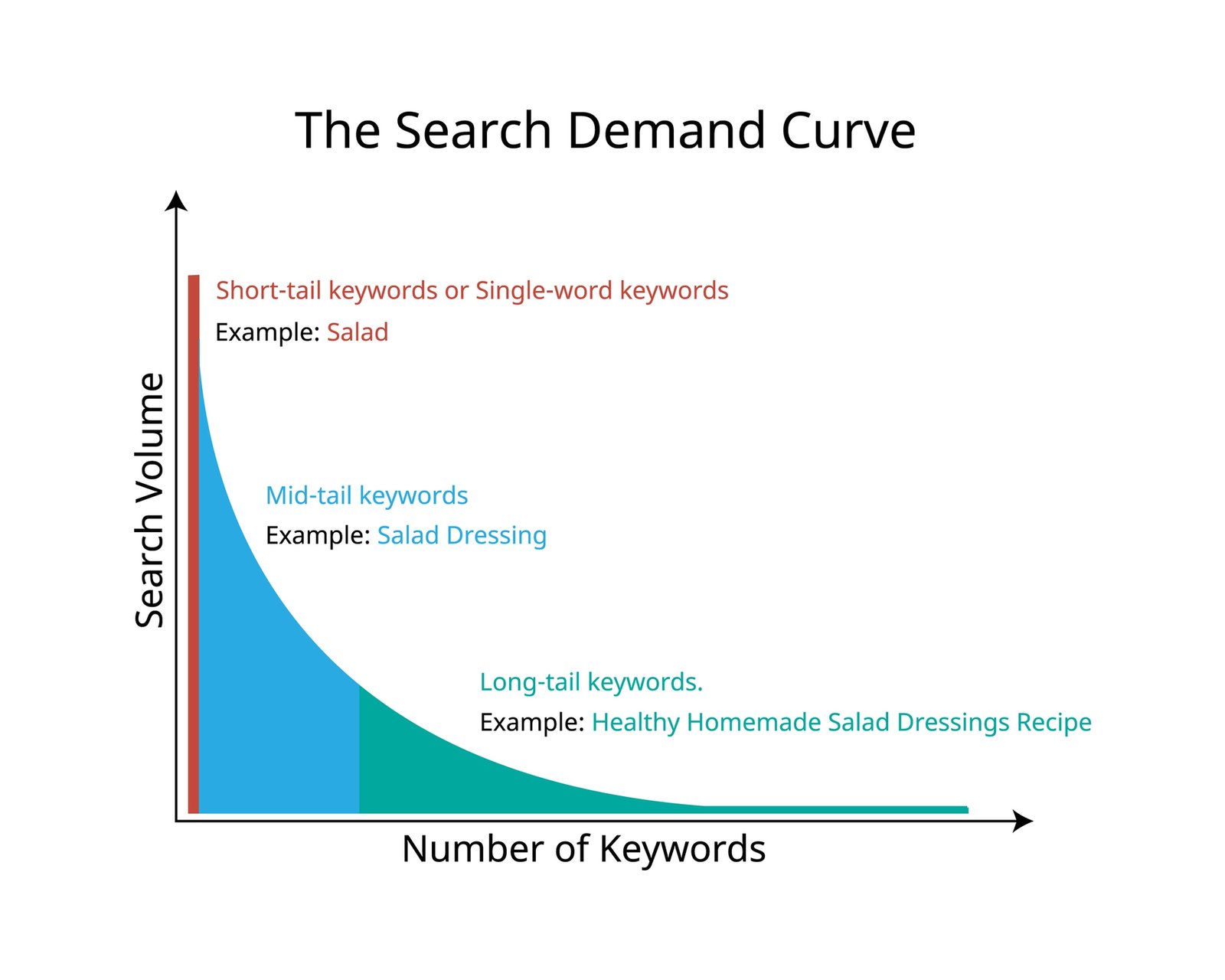
Step 4: Find Long-Tail Keywords
Long-tail keywords are often more specific or less frequently searched than broad terms.
As a result, they can help you focus on a particular audience need.
For example:
| Broad topic | More specific keyword |
|---|---|
| SEO | SEO tips for small business websites |
| Keyword research | How to find SEO keywords for a new website |
| Digital marketing | Digital marketing basics for students |
| Content writing | How to write an SEO-friendly blog |
| Google Ads | How to create your first Google Ads campaign |
For instance, someone searching for “SEO” may want many different things.
However, a person searching for “how to find SEO keywords for a new website” has a clearer question.
Therefore, a focused tutorial may be more useful for that search.
Still, remember that long-tail keywords aren’t automatically easier to rank for.
Beginner tip: Choose specific keywords that match your content and audience.
Step 5: Understand Search Intent
Search intent means the reason behind someone’s search.
In simple words, it explains what the person wants to do.
For example, someone searching for “what is SEO” wants information. Meanwhile, someone searching for “buy SEO software” may be ready to make a purchase.
Therefore, both searches need different content.
There are four common types of search intent.
Informational Search Intent
Informational searches happen when people want to learn something.
Examples include:
- What is keyword research?
- How does SEO work?
- How to find SEO keywords?
Therefore, tutorials and educational blogs often suit these searches.
Navigational searches happen when users want to visit a specific website.
For example, someone might search for “Google Search Console login.”
In this case, the person already knows which website they want.
Commercial Search Intent
Commercial searches happen when users compare products or services.
For instance, someone might search for “best SEO tools for beginners.”
As a result, comparison guides and reviews can be useful.
Transactional Search Intent
Transactional searches happen when users want to complete an action.
For example, they may search for “buy SEO software” or “enroll in digital marketing course.”
Therefore, relevant product pages or course pages may be appropriate.
Beginner tip: Always check the Google search results before choosing a content format.
Step 6: Check Keyword Search Volume and Difficulty
After finding keyword ideas, you need to compare them.
Two useful metrics are search volume and keyword difficulty.
What Is Keyword Search Volume?
Search volume estimates how often people search for a keyword during a given period.
For example, SEO tools may show an estimated number of monthly searches.
However, these figures can vary between tools.
Therefore, use them as estimates rather than exact predictions.
What Is Keyword Difficulty?
Keyword difficulty is an estimate offered by some SEO tools.
It helps you understand how challenging ranking for a keyword might be.
However, different platforms use different methods to calculate it.
Moreover, keyword difficulty is not an official Google ranking factor.
Before choosing a keyword, consider:
- Is it relevant to my audience?
- Does it match my content?
- What does the search volume suggest?
- How strong are the competing pages?
- Can I create something useful?
For instance, a new website may find a focused beginner topic more practical than a broad subject.
Therefore, compare relevance and competition rather than relying on a single metric.
Step 7: Analyze Competitor Pages
Now, search your selected keyword on Google.
Next, review the pages that appear in the results.
Look at their:
- Titles and headings
- Main content topics
- Examples and explanations
- Images and visuals
- Common questions
- Overall readability
For example, imagine most pages for “keyword research for beginners” are detailed tutorials.
In that case, readers may expect a complete step-by-step guide.
However, don’t copy the competing articles.
Instead, identify gaps and create content that explains the topic more clearly.
Additionally, include original examples that help beginners understand the process.
Step 8: Choose Your Main Keyword and Related Keywords
Once you’ve reviewed your research, select a primary keyword.
For this blog, the main keyword is:
Keyword research for beginners
Related terms include:
- How to do keyword research
- Keyword research in SEO
- Free keyword research tools
- Long-tail keywords
- SEO search intent
- SEO keywords for beginners
These phrases can help you explain the topic more fully.
However, don’t force every keyword into your content.
Instead, use them when they fit naturally.
As a result, your article can remain clear and easy to read.
Step 9: Create a Keyword-Based Content Plan
After choosing your keywords, organize them into topics.
For example:
| Main topic | Supporting blog ideas |
|---|---|
| Keyword research | Beginner guide, free keyword tools |
| SEO basics | What is SEO, on-page SEO tips |
| Content marketing | Blog writing, content strategy |
| Google Ads | Google Ads basics, SEO vs PPC |
| Website SEO | Internal links, image SEO |
First, choose the most useful topic for your audience.
Next, create an article that answers the main question.
Then, plan related content to support it.
Additionally, use internal links to connect helpful pages.
For more content ideas, explore the LOCAS blog library.
Step 10: Optimize Your Blog for SEO
Finally, use your selected keyword to optimize your article.
However, make sure the writing stays natural.
Let’s explore the important areas.
Write an SEO-Friendly Title
Your SEO title should clearly explain what the article covers.
For example:
Keyword Research for Beginners: Step-by-Step Guide
This title includes the primary keyword and explains what readers will learn.
Use Keywords Naturally
Place your focus keyword in suitable locations.
These may include:
- SEO title
- H1 heading
- Opening paragraph
- URL slug
- Meta description
- Relevant subheadings
- Main article content
However, avoid repeating the same phrase too often.
Instead, focus on making your content helpful.
Add Relevant Internal Links
Internal links connect different pages on your website.
For example, a keyword research guide can link to an article about SEO basics.
As a result, readers can explore related topics more easily.
You can also learn more about website structure in Google’s SEO Starter Guide.
Include Helpful External Links
External links can lead readers to useful resources.
For instance, Google’s official documentation can help explain its SEO tools.
However, avoid adding unrelated links just to increase the number of links.
Optimize Your Images
Images can make your article easier to understand.
For example, a keyword research workflow diagram can show the main steps visually.
Additionally, write clear alt text that describes each informative image.
Avoid Keyword Stuffing
Finally, don’t repeat keywords in every sentence.
Instead, explain the topic clearly and use related terms where appropriate.
Remember, your main goal is to help readers find useful information.
A Practical Example of Keyword Research for Beginners
Let’s apply the process to a simple example.
Imagine you’re creating a blog that teaches SEO.
Your target audience includes students and beginners.
Here’s how you could organize your keyword research:
| Research element | Example |
|---|---|
| Website topic | Digital marketing |
| Target audience | Students and beginners |
| Seed keyword | Keyword research |
| Primary keyword | Keyword research for beginners |
| Search intent | Informational |
| Content format | Step-by-step guide |
| Supporting topic | Free keyword research tools |
| URL slug | keyword-research-for-beginners |
| Main goal | Help readers learn SEO |
First, identify your audience and select a seed keyword.
Next, use free tools to discover related searches.
Then, study search intent and competing pages.
After that, choose a primary keyword and organize your content.
Finally, write an article that answers the reader’s questions.
As a result, you’ll have a more focused plan for your blog.
Common Keyword Research Mistakes to Avoid
Even with useful tools, beginners can make mistakes.
However, understanding these problems can help you avoid them.
1. Choosing Only High-Volume Keywords
High search volume doesn’t always mean a keyword is right for your website.
Instead, choose keywords that match your audience’s needs.
2. Ignoring Search Intent
Sometimes, a keyword looks promising but doesn’t suit your content.
Therefore, review the search results before writing.
3. Repeating Keywords Too Often
Too many repeated keywords can make content difficult to read.
Instead, write naturally and focus on useful information.
4. Ignoring Long-Tail Keywords
Specific search phrases can reveal useful content ideas.
Therefore, don’t limit your research to broad keywords.
5. Copying Competitor Content
Competitor research can help you understand a topic.
However, copying another article doesn’t create original value.
Instead, provide clearer explanations and practical examples.
6. Forgetting Internal Links
Internal links help visitors find related content.
Therefore, connect relevant articles whenever it improves the reading experience.
7. Not Reviewing Keyword Performance
Search trends and audience needs can change over time.
For this reason, review your content regularly.
You can use the Google Search Console Performance report to understand search impressions, clicks, and queries.
Frequently Asked Questions About Keyword Research
What Is Keyword Research for Beginners?
Keyword research for beginners is the process of finding search terms that people use on Google. As a result, it helps new website owners plan useful content for their audience.
How Can I Start Keyword Research for Free?
First, identify your main topic and audience. Next, create a list of seed keywords. Then, use free tools such as Google Keyword Planner and Google Trends to discover related searches.
Which Keyword Research Tool Is Best for Beginners?
Google Keyword Planner can help you find keyword ideas. Meanwhile, Google Search Console helps you review your website’s search performance.
How Many Keywords Should I Use in One Blog?
There is no fixed number. Instead, choose one primary keyword and include relevant supporting terms naturally.
Are Long-Tail Keywords Good for SEO?
Yes, long-tail keywords can help you focus on specific search needs. However, they aren’t always easier to rank for.
How Often Should I Do Keyword Research?
Research keywords before creating new content. Additionally, review your existing keywords when search trends or audience needs change.
Can Keyword Research Improve Google Rankings?
Keyword research helps you create more relevant content. However, rankings also depend on content quality, competition, technical SEO, and other factors.
Conclusion: Start Your Keyword Research Journey
Keyword research for beginners doesn’t have to be difficult.
First, understand your audience and choose a few seed keywords.
Next, use free SEO tools to discover related searches.
Then, check search intent, compare competing pages, and select useful keywords.
After that, organize your ideas into a clear content plan.
Finally, create articles that answer your audience’s questions.
As you practice, you’ll become more confident in choosing keywords and planning SEO content.
Remember, the goal isn’t simply to attract more traffic. Instead, focus on reaching the right audience with useful information.
Want to learn more about SEO and digital marketing?
Explore the Digital Marketing Course at LOCAS in Ludhiana and start developing your digital marketing skills.